 COBOX
COBOX
What Features Should Be Included in an MVP?
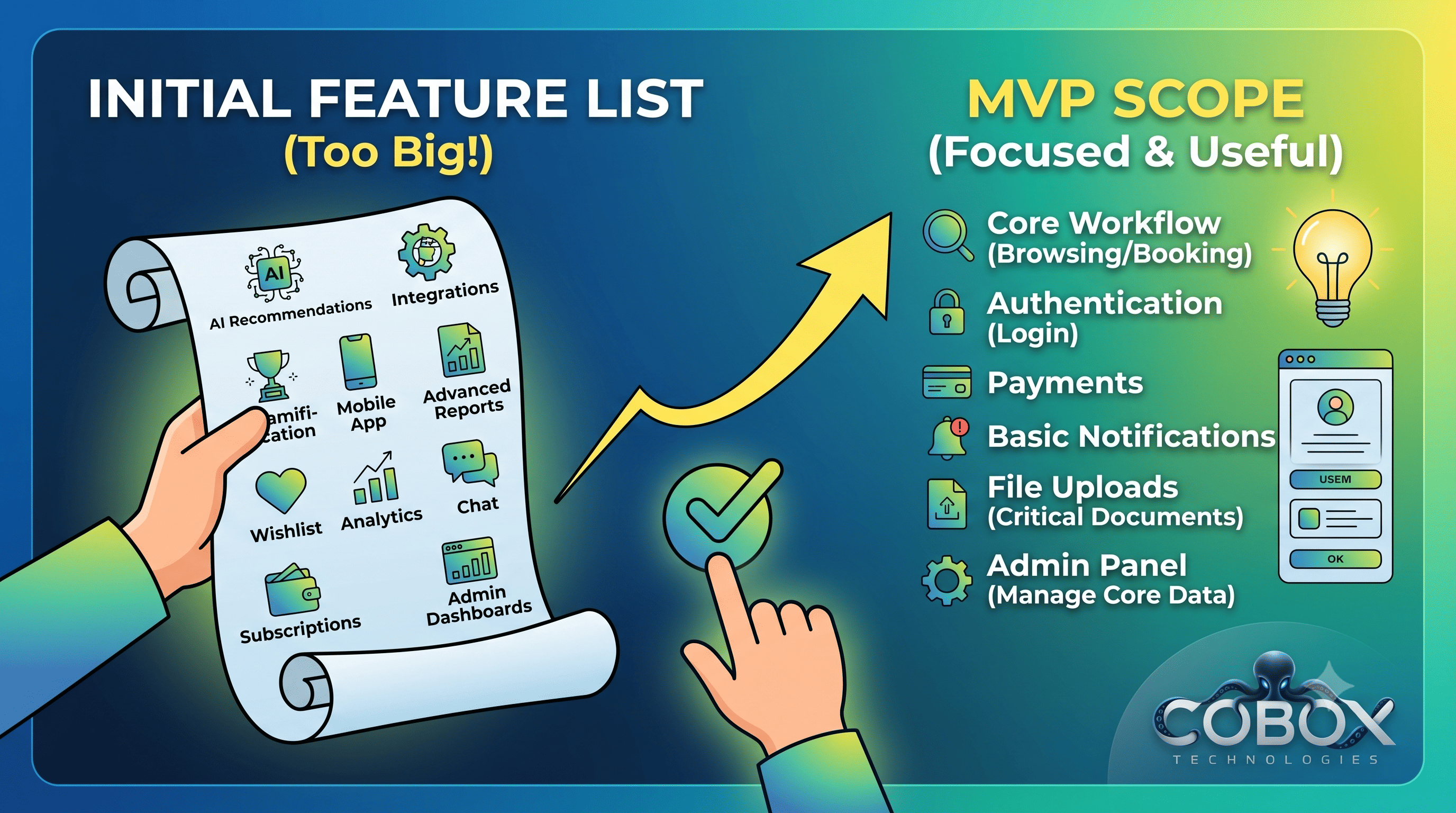
What Features Should Be Included in an MVP?
Learn which features belong in an MVP, how to prioritize them, what to leave for later, and how to build a focused first version without sacrificing product quality.
Slug: what-features-should-be-included-in-an-mvp
Category: Startup & Product Development
Author: Himanshu Sharma
Publish Date:
Primary Keyword: MVP features
Secondary Keywords:
MVP features list, what to include in an MVP, MVP development, minimum viable product features, startup MVP features, MVP feature prioritization, MVP product development
Excerpt:
Learn which features belong in an MVP, how to prioritize them, what to leave for later, and how to build a focused first version without sacrificing product quality.
---
One of the hardest parts of building an MVP is deciding what not to build.
Most founders start with a long feature list.
The list might include:
- User registration
- Profiles
- Payments
- Notifications
- Analytics
- Reports
- Chat
- Mobile apps
- AI
- Integrations
- Subscriptions
- Admin dashboards
- Advanced search
- Recommendations
- Automation
The problem is that every additional feature increases development effort, testing requirements, maintenance, and the time before customers can use the product.
An MVP should therefore answer a simple question:
What is the smallest set of features required to solve the core customer problem and learn whether the product has demand?
The answer will be different for every product.
This guide explains how to find that answer.
---
What Is an MVP?
MVP stands for Minimum Viable Product.
An MVP is the first practical version of a product that allows a business to deliver its core value to a specific customer group and learn from real usage.
It does not mean:
- The cheapest possible software
- An unfinished application
- A collection of temporary features
- Poor UI/UX
- Unreliable functionality
A better definition is:
Minimum scope required to deliver meaningful value and test important business assumptions.
The scope should be small.
The core experience should still work reliably.
---
Start With the Customer Problem
Before creating a feature list, write down the problem.
For example:
Small businesses receive customer enquiries through WhatsApp but struggle to track, assign, and follow up with those leads.
Now define the desired outcome:
Sales teams should be able to capture enquiries, assign them to employees, track their status, and follow up from one system.
Only after defining the outcome should you start identifying features.
---
Identify the Core User Journey
Every product has one or more important workflows.
For example, an appointment-booking application might have this journey:
Customer
↓
Search service
↓
Select provider
↓
Choose time
↓
Book appointment
↓
Pay
↓
Receive confirmation
The MVP needs to support this journey.
Features unrelated to this workflow may be candidates for later releases.
---
The Core Feature Test
For every proposed feature, ask:
Question 1
Does the customer need this to complete the core workflow?
If yes, it is likely an MVP feature.
Question 2
Does this feature directly help validate the business idea?
If yes, it may belong in the MVP.
Question 3
Can the process be handled manually during the MVP stage?
If yes, you may not need to automate it immediately.
Question 4
What happens if we don't build it?
If the answer is:
"The core product still works."
then the feature may not belong in version one.
---
The Must-Have / Should-Have / Later Framework
A simple prioritization model is:
Must Have
The product cannot deliver its core value without it.
Should Have
The feature improves the experience but is not required for the first useful version.
Later
The feature can be added after you have customer data and feedback.
For example, an online learning platform might look like this:
| Must HaveShould HaveLater | ||
|---|---|---|
| Registration | Course search | AI recommendations |
| Course access | Progress tracking | Gamification |
| Video playback | Certificates | Community |
| Payment | Notifications | Mobile app |
| Basic admin | Reports | Advanced analytics |
This prevents the MVP from becoming a full product.
---
1. Authentication
Many products need basic authentication.
Depending on the product, this may include:
- Registration
- Login
- Logout
- Password reset
- Email verification
However, not every MVP requires a complex authentication system.
For example, an internal prototype may use controlled accounts during early testing.
The requirement depends on the product and the validation method.
---
2. User Profiles
A profile may be necessary when customer information is central to the product.
Examples include:
- Marketplace
- Social platform
- Professional network
- Healthcare platform
- Learning platform
But avoid collecting information you do not currently need.
If your product only needs:
- Name
- Phone
do not create a 30-field registration form.
Every additional field creates friction.
---
3. The Core Business Workflow
This is usually the most important part of the MVP.
It is the functionality that creates the product's value.
Examples:
CRM
Capture → Assign → Follow Up → Close
Marketplace
Search → Match → Book → Pay
SaaS
Configure → Use → Get Result
Delivery
Order → Process → Ship → Track
Booking
Search → Select → Book → Confirm
The MVP should make this workflow reliable.
---
4. Basic Dashboard
Many applications need a dashboard, but it does not need to contain everything.
A first dashboard may only show:
- Important tasks
- Recent activity
- Current status
- Key transactions
- Primary actions
Avoid filling the dashboard with twenty charts simply because analytics are available.
Show information that helps the user make a decision or complete the next action.
---
5. Admin Panel
Many products need administrative functionality from the beginning.
The admin may need to:
- Manage users
- Manage content
- Manage orders
- Review transactions
- Handle support requests
- Configure basic settings
But an admin panel should also have a defined scope.
Do not build a complete business intelligence platform before you have customers.
---
6. Payments
If the business model requires customers to pay during the core workflow, payment functionality belongs in the MVP.
For example:
Customer → Select service → Pay → Receive confirmation
In this case, payment is part of the core product.
But if payment is not required to validate the initial product concept, it may be possible to use manual invoicing or payment collection during the earliest pilot.
The key question is:
Do we need automated payments to test the business model?
---
7. Notifications
Notifications can be useful for:
- OTP
- Booking confirmation
- Order updates
- Payment status
- Password reset
- Important system events
But you do not necessarily need every notification channel.
For an MVP, you may start with:
and later add:
- SMS
- Push notifications
Choose channels based on the customer's workflow.
---
8. Search and Filters
Search is essential for some products and unnecessary for others.
A marketplace may need:
- Keyword search
- Category
- Location
- Price
- Availability
A small internal workflow application may not need search at all during the first release.
Do not add search simply because "every application should have search."
Add it when the amount of information makes it necessary.
---
9. File Uploads
File management can be an important MVP feature for products involving:
- Documents
- Images
- Contracts
- Applications
- Verification
- Reports
If files are part of the core business process, build the required upload and access workflow.
You may not need advanced document processing initially.
---
10. Reporting
Reporting should be tied to a business decision.
For example:
A sales manager may need:
- Leads received
- Leads assigned
- Conversion rate
- Revenue
That may be enough initially.
Advanced reporting such as:
- Custom report builder
- Multiple dashboards
- Predictive analytics
- Complex segmentation
can usually come later unless it is the product's primary value.
---
11. Integrations
Third-party integrations can be useful but can also increase complexity.
Examples include:
- Payment gateways
- SMS
- Accounting systems
- CRM systems
- Maps
- AI APIs
Ask:
Does this integration need to exist for the MVP to provide its core value?
If not, consider handling the process manually during early validation.
---
12. AI Features
AI can be valuable, but it should not automatically be included because it is popular.
Ask:
What specific customer problem does the AI feature solve?
For example:
Instead of:
"We need an AI chatbot."
Define:
"Customers repeatedly ask the same 20 support questions, and the support team spends two hours every day answering them."
Now an AI support assistant has a clear business purpose.
If the AI feature is not central to the value proposition, it may be better to introduce it after validating the core product.
---
13. Mobile Applications
A mobile app should not automatically be part of the MVP.
Ask:
Can customers successfully use the product through a responsive web application?
If yes, a web application may be sufficient initially.
A mobile application becomes more important when the product depends on:
- GPS
- Camera
- Push notifications
- Offline functionality
- Frequent mobile usage
- Device capabilities
The platform should follow the customer workflow.
---
How to Prioritize Features
A practical method is to score each feature using four questions.
| QuestionConsideration | |
|---|---|
| Customer impact | How important is it to users? |
| Business impact | Does it affect revenue or validation? |
| Development effort | How difficult is it to build? |
| Dependency | Does another feature depend on it? |
For example:
| FeatureCustomer ImpactBusiness ImpactEffortMVP? | ||||
|---|---|---|---|---|
| Registration | High | High | Low | Yes |
| Core workflow | High | High | Medium | Yes |
| Payment | High | High | Medium | Usually |
| AI recommendations | Medium | Low | High | Later |
| Advanced analytics | Medium | Medium | High | Later |
| Mobile app | Medium | Medium | High | Depends |
This gives your team a more rational basis for prioritization.
---
The Feature Dependency Problem
Some features cannot exist independently.
For example:
Online booking
may require:
- User
- Service
- Availability
- Booking
- Payment
You cannot simply remove "availability" if the booking system depends on it.
Create a dependency map before finalizing the MVP.
This prevents seemingly small features from being removed without understanding their impact on the core workflow.
---
What Should You Leave Out?
Common candidates for later releases include:
Advanced Analytics
Build basic metrics first.
AI Recommendations
Add after you understand customer behavior.
Complex Automation
Automate repetitive workflows after observing them.
Multiple Integrations
Start with integrations that directly affect the core workflow.
Multiple Platforms
Start with the platform your customers actually need.
Customization
Avoid allowing customers to configure everything in version one.
Advanced Permissions
Implement the roles required for the initial use case rather than every possible permission combination.
---
Example: MVP for an E-Commerce Platform
Suppose you want to build a niche e-commerce business.
MVP Features
Customer
- Registration/login
- Product browsing
- Product details
- Cart
- Checkout
- Payment
- Order history
Admin
- Product management
- Inventory
- Orders
- Customers
- Basic reports
Operations
- Order confirmation
- Shipping update
- Delivery status
This can support the fundamental transaction:
Browse → Buy → Pay → Fulfill
---
Features for Later
Once customers are using the platform, you could consider:
- Wishlist
- Loyalty program
- Product recommendations
- Advanced coupons
- Referral program
- AI shopping assistant
- Personalized homepage
- Advanced analytics
- Mobile application
These features may eventually become valuable.
They simply do not need to be part of the first release unless the business case requires them.
---
MVP Does Not Mean Technical Debt Everywhere
There is a difference between reducing product scope and writing careless software.
Avoid cutting corners on fundamental engineering practices such as:
- Authentication
- Authorization
- Input validation
- Database integrity
- Error handling
- Backups
- Logging
- Basic security
- Testing of critical workflows
You can build fewer features without building unreliable software.
---
Don't Build the Admin Before Understanding Operations
Admin functionality should reflect how the business actually operates.
For example, an order-management system may need:
New → Confirmed → Packed → Shipped → Delivered → Cancelled
That workflow should be defined before building the admin interface.
Otherwise, developers may build screens that look complete but do not match real operations.
---
Don't Forget Non-Functional Requirements
MVP discussions usually focus on features.
But some requirements are not visible features.
These include:
- Performance
- Security
- Availability
- Data backup
- Logging
- Monitoring
- Scalability
- Privacy
You do not need enterprise-level infrastructure for every MVP.
But you should define reasonable requirements based on the product.
For example, a payment platform has different reliability requirements from an internal prototype.
---
A Simple MVP Feature Checklist
Before approving a feature, ask:
Customer
- Does the customer need this to solve the core problem?
Business
- Does this help validate our business model?
Product
- Is this part of the primary user journey?
Technology
- Does another core feature depend on it?
Operations
- Does the business need it to fulfill customer requests?
Timing
- Can we safely build this after launch?
If the feature fails most of these tests, it is probably not an MVP priority.
---
How Many Features Should an MVP Have?
There is no universal number.
An MVP could contain:
- 5 major features
- 10 features
- 20 features
What matters is not the number.
What matters is whether those features form a complete, useful customer journey.
A product with 30 unrelated features may be less useful than a product with six well-designed features that solve one important problem.
Think in terms of workflows rather than feature counts.
---
MVP Feature Planning Example
Imagine you want to build software for managing business quotations.
Core problem
Sales teams create quotations manually using spreadsheets and documents.
Core outcome
A salesperson should be able to create, send, and track a quotation.
MVP workflow
Create Customer
↓
Create Quotation
↓
Add Products
↓
Calculate Total
↓
Generate PDF
↓
Send to Customer
↓
Track Status
MVP features
- Login
- Customer management
- Product management
- Quotation creation
- Automatic calculation
- PDF generation
- Quotation status
- Basic dashboard
- Admin management
Later
- AI quotation generation
- Advanced analytics
- CRM integrations
- Mobile application
- Workflow automation
- Advanced approval chains
The MVP directly supports the core business process.
---
What Happens After the MVP?
The MVP is not the end.
After launch, you should collect:
- User feedback
- Product analytics
- Support requests
- Sales objections
- Feature requests
- Retention data
- Conversion data
Then determine what to build next.
Your roadmap should gradually move from:
Validation
to:
Usability
to:
Retention
to:
Revenue
to:
Scale
Different products will follow different sequences.
---
Final Thoughts
The hardest part of MVP development is often not writing code.
It is deciding what not to build.
Start with the customer problem.
Map the core workflow.
Identify the smallest set of capabilities required to complete that workflow.
Then separate everything else into:
Must Have → Should Have → Later
An effective MVP should be:
- Small enough to build quickly
- Useful enough for customers
- Reliable enough for real usage
- Focused enough to generate meaningful feedback
- Flexible enough to evolve
Do not measure your MVP by how many features it contains.
Measure it by whether it helps you answer the business questions that matter.
The objective is not to launch the smallest possible application.
It is to launch the smallest useful product that can teach you what to build next.
---
How COBOX Can Help
COBOX helps founders and businesses turn broad product ideas into focused MVP requirements.
The process can include:
- Product discovery
- Customer workflow analysis
- Feature prioritization
- MVP scope definition
- UI/UX design
- Technical architecture
- Web application development
- API development
- Admin panel development
- Payment and third-party integrations
- Testing
- Deployment
If your feature list keeps growing, the first step may not be adding more developers.
It may be deciding which features actually need to exist in version one.
---