 COBOX
COBOX
How to Digitise a Manufacturing Business: Production, Inventory, ERP and Automation
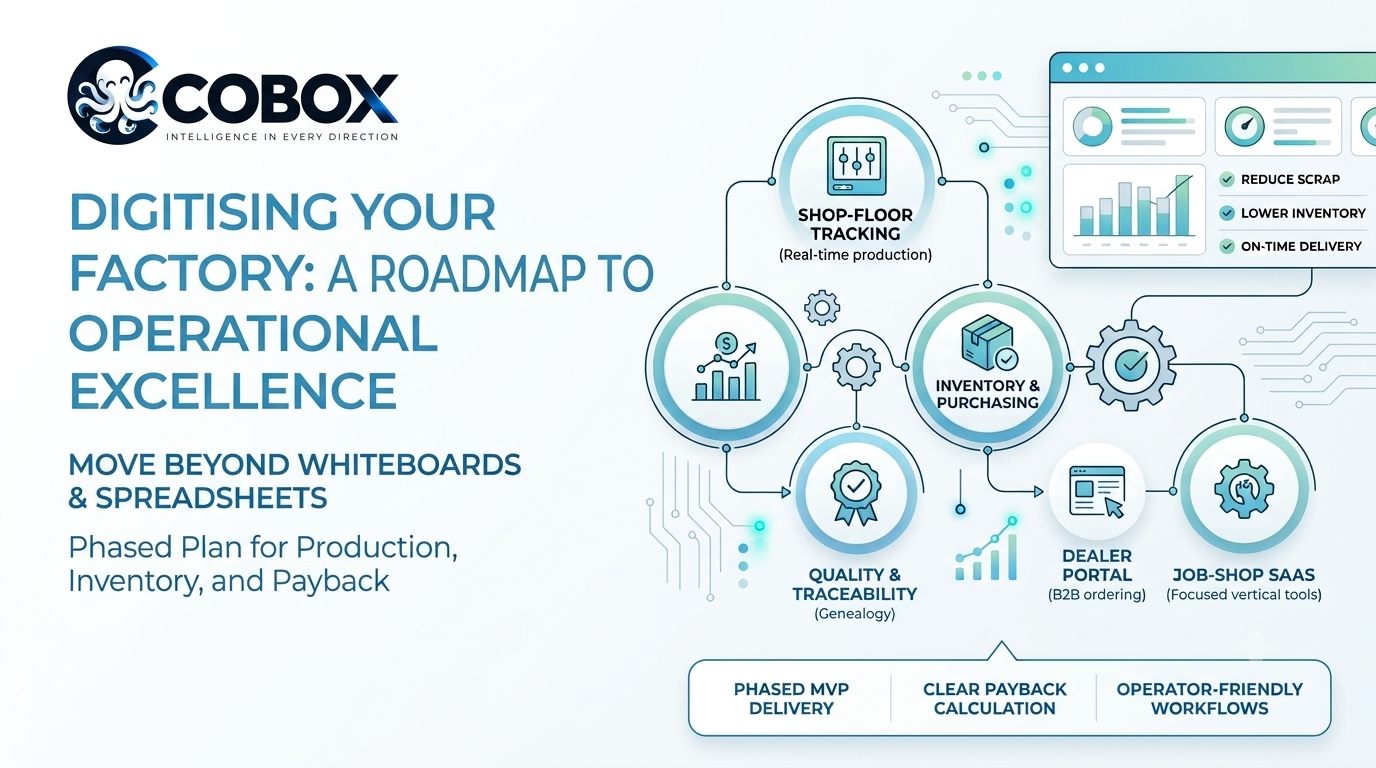
Walk through a small or mid-sized factory and you will often find the same picture: production plans on a whiteboard, stock counts in a spreadsheet, purchase orders in email, quality checks on paper, and a founder who is the only person who knows where everything stands. The factory runs, sometimes very well. But every decision depends on someone remembering or asking, and growth makes that harder.
This guide is for owners and managers of manufacturing businesses who want to digitise operations, and for entrepreneurs who see a business in building software or services for factories. It explains where digitisation pays back, five concrete business ideas, what the systems need to do, and how to judge the return honestly. All examples are hypothetical and all figures illustrative, because every factory's costs differ.
How a manufacturing business runs, and where it leaks
A factory converts materials into finished goods through a sequence: demand (orders or forecasts), planning, purchasing, production, quality checking, storage and dispatch, then invoicing. Information has to flow along the same path. When it does not, the leaks are predictable:
- Scrap and rework that nobody can trace to a machine, shift or batch.
- Stock mismatches: raw material that exists but is not recorded, or recorded but missing.
- Late or unplanned purchasing, causing expensive urgent orders or idle machines.
- Unknown true cost of a product because material, labour and overheads are not tied to each job.
- Slow quotes and order status calls from dealers and customers.
- Machine downtime discovered only after it happens.
Digitisation does not mean installing a giant ERP on day one. It means capturing the right data at the right point and using it to make better decisions.
Five manufacturing business ideas
1. Shop-floor production tracking for an existing factory
Concept: record what is made, on which machine, by whom and with what outcome, in real time. Customer: a factory owner who cannot see the floor. Value: live visibility and traceable scrap. Revenue (for a service provider): implementation fee plus annual support. Operations: tablets or barcode scanners at workstations. Product: job cards, production logging, downtime reasons and a live dashboard. Risks: operator adoption. Validate by: piloting on one line for four weeks and comparing logged output to manual counts.
2. Inventory, bill of materials and purchasing control
Concept: connect stock, product recipes (bills of materials) and purchase orders so reorders trigger from real consumption. Customer: a manufacturer carrying too much stock in some items and running out of others. Value: lower working capital and fewer stoppages. Revenue: project fee plus maintenance. Product: multi-location stock, reorder levels, supplier management and goods receipt. Risks: bad opening data. Validate by: a physical count and a pilot on the top 50 items.
3. Quality and traceability system
Concept: record inspections and link each finished lot to its materials and process settings. Customer: suppliers to automotive, electronics or regulated buyers who demand traceability. Value: faster root-cause analysis and easier customer audits. Revenue: subscription or project fee. Product: inspection checklists, non-conformance reports, lot genealogy and certificates. Risks: customer-specific standards. Validate by: reconstructing one past complaint using only the new records.
4. Dealer and distributor ordering portal
Concept: let dealers browse your catalogue, see their prices and stock availability, and place orders without phone calls. Customer: manufacturers who sell through distributors. Value: fewer order errors and faster fulfilment. Revenue: reduced selling cost and order processing time. Product: a B2B ordering portal tied to inventory and invoicing. See B2B e-commerce. Risks: dealers who prefer calling. Validate by: onboarding five willing dealers.
5. Vertical software for small job-shops
Concept: a focused SaaS for a specific kind of small manufacturer, for example CNC job-shops or packaging units, covering quotes, jobs, inventory and invoicing. Customer: small factories too small for heavy ERP. Value: a system shaped to their way of working. Revenue: monthly subscription per factory. Risks: long sales cycles and low willingness to change. Validate by: shadowing ten job-shops and building the single screen they ask for most.
Revenue models
For a manufacturer digitising its own operations, the "revenue" is savings and capacity: less waste, lower inventory, faster delivery, more output from the same plant. For a business selling the solution, the options are:
- Implementation projects: fixed-scope fees for set-up, data migration and training.
- Annual maintenance contracts: support, updates and small enhancements.
- SaaS subscription: per factory, per user or per machine.
- Usage-based pricing: per connected machine or per job tracked.
- Premium modules: quality, maintenance or analytics add-ons.
Transaction commissions rarely make sense in this industry.
A hypothetical factory, end to end
Consider a fictional metal-fabrication unit run by a family. It makes components for local OEMs, with 45 employees and orders arriving by phone and email. This is a composite, not a real client.
- Problem: late deliveries, uncertain stock and no idea which jobs make money.
- Customers: three regular OEM buyers and a few ad-hoc clients.
- Opportunity: reduce scrap, improve on-time delivery and win larger buyers that require traceability.
- Getting orders: unchanged: relationships and quotes. Digitisation improves quoting speed and reliability.
- A transaction: an order is entered once; it creates a job with a bill of materials, checks stock, raises purchase requests for shortages and schedules machines.
- Delivery: operators log output and rejects on a tablet; quality signs off; dispatch generates the invoice and e-way bill details.
- Revenue collection: invoices issued the same day and tracked against payments.
- Software needed: orders, BOM, inventory, production logging, quality checks, dispatch and invoicing.
- Validate first: one product line, four weeks, comparing scrap and delays against the previous month.
- Expand: roll out to all lines, add maintenance scheduling and a customer status portal.
What the systems need to do
- Order and job management: one entry point, with status visible to sales and production.
- Bill of materials and routing: what goes into each product and which operations it passes through.
- Inventory: raw material, work-in-progress and finished goods by location, with batch or lot tracking where required.
- Purchasing: requisitions, approvals, supplier history and goods receipt matching.
- Production logging: output, rejects, downtime reasons and operator, captured with the fewest taps possible.
- Quality: inspection plans, measurements, non-conformance records and certificates.
- Maintenance: scheduled servicing and breakdown records per machine.
- Costing and invoicing: actual job cost versus quote, with accounting integration. See how to connect CRM, accounting and order systems.
- Roles: operator, supervisor, store, purchase, quality and owner each see different screens.
- Machine data (optional): sensors or PLC connections for automatic counts and downtime. Add this after manual logging proves its value.
- Dashboards: on-time delivery, scrap rate, stock value and machine utilisation. Our analytics dashboard work covers this layer.
MVP versus later phases
| Capability | MVP | Later phase |
|---|---|---|
| Orders and jobs | Order entry, job cards, status | Finite-capacity scheduling |
| Inventory | Single-site stock with reorder levels | Multi-site, batch and expiry, valuation methods |
| Production | Manual logging by operators | Automatic data from machines |
| Quality | Digital checklists and rejects | Statistical process control, supplier scorecards |
| Purchasing | Purchase requests and orders | Supplier portal, automated reorder |
| Reporting | Daily output, scrap, stock | Predictive maintenance, cost analytics |
Pick one painful process first. The advice in which business process to automate first applies directly: choose the one that is frequent, costly and well understood.
Technology approach
Many factories already run accounting software and perhaps a legacy ERP. Replacing everything at once is risky; read how to modernise old software without disrupting operations. A practical approach is to build the missing workflow layer (production, quality, dispatch) as a web application on Laravel or Node.js with MySQL or PostgreSQL, and integrate with existing accounting through APIs. Run it on tablets and ordinary PCs; install it on a local server only if internet reliability demands it, otherwise on a cloud host with offline-tolerant screens for the shop floor. Use barcodes or QR labels before investing in IoT. Python is worth adding only for specific analysis or forecasting tasks. Avoid microservices; a well-structured single application is easier for a small IT team to support.
Cost and timeline (illustrative)
Assumptions: one plant, 30 to 60 users, a defined set of modules (orders, inventory, production logging, quality, dispatch), integration with one accounting package, no machine sensors. These are planning ranges, not a COBOX quotation.
| Item | Illustrative range |
|---|---|
| Process mapping and Blueprint | 2 to 4 weeks |
| Core MVP build | Roughly ₹18 to 35 lakh (about US$21,000 to 41,000 at around ₹85 per US$), 4 to 6 months |
| Data migration and training | Often underestimated; plan weeks, not days |
| Hardware | Tablets, barcode scanners and label printers |
| Hosting | Modest monthly cost on cloud |
| Maintenance | Commonly budgeted at a meaningful yearly percentage of build cost |
Main cost drivers are the number of modules, quality of existing data, number of integrations and the amount of change management needed.
The business case, with numbers
For a factory, the question is payback. A hypothetical example with annual revenue of ₹12 crore:
| Item | Calculation | Annual amount (₹) |
|---|---|---|
| Material spend | 50% of revenue | 6,00,00,000 |
| Current scrap and rework | 5% of material | 30,00,000 |
| Scrap saving | Reduce to 3.5% (1.5% of 6 crore) | 9,00,000 |
| Inventory held | ₹2 crore; reduce 10% = ₹20 lakh released | One-time cash release |
| Inventory carrying saving | 15% of ₹20 lakh | 3,00,000 |
| Admin time saved | 2 people × ₹20,000 × 12 months | 4,80,000 |
| Total annual benefit | 9,00,000 + 3,00,000 + 4,80,000 | 16,80,000 |
| Ongoing cost | Support and hosting | 4,00,000 |
| Net annual benefit | 16,80,000 − 4,00,000 | 12,80,000 |
With a ₹25 lakh investment, payback is 25 ÷ 12.8 ≈ 1.95 years, about 23 months, ignoring the one-time ₹20 lakh cash release and any extra revenue from better on-time delivery. Notice what is assumed: scrap actually falls, people actually change habits, and the admin time saved is real. If scrap only falls by half as much, the saving drops by ₹4.5 lakh and payback stretches beyond two and a half years. The point of a business case is to find those sensitivities before spending. These are invented figures, not predictions.
A rollout plan in seven phases
- Research and validation: measure baseline scrap, stock accuracy and on-time delivery for a month.
- Blueprint and requirements: map the process, choose the first workflow, define success numbers. A Business Blueprint structures this.
- Build the first workflow: for example production logging plus inventory for one line.
- Pilot: run one line for four to six weeks, and keep the old method in parallel until numbers reconcile.
- Roll out: add lines and departments in turn; train supervisors first.
- Operational improvement: use dashboards to act on the top three causes of waste.
- Expansion: maintenance, dealer portal, machine connectivity and analytics.
Risks and compliance
- User adoption: if operators see logging as extra work, data will be poor. Involve them early and keep screens simple.
- Bad data: migrate carefully; inaccurate opening stock undermines trust.
- Overbuilding: trying to replicate a full ERP on day one stalls projects.
- Downtime and connectivity: shop-floor screens must keep working through short outages.
- Security: designs, pricing and customer data are valuable. Apply role-based access and backups; see our security checklist.
- Regulatory and customer standards: GST and e-way bill requirements for dispatch, sector-specific quality standards such as ISO or customer audits, and safety rules for plant and machinery. Which apply depends on your products and customers; confirm with the relevant professionals.
Named rules are pointers, not legal advice.
How COBOX can help
COBOX begins with how your factory really works. We map the process, quantify where waste occurs, and write a Blueprint that sequences the work so the first release pays for itself. We then design and build the workflow software, integrate it with your accounting and existing systems, and support roll-out and refinement. See our manufacturing page and business process automation for the approach. If you are replacing spreadsheets, when to upgrade from Excel and WhatsApp is a useful starting point.
Frequently asked questions
Do I need a full ERP?
Not necessarily. Many factories gain more from a focused workflow system integrated with existing accounting than from a full ERP replacement.
What should the first release include?
One high-pain workflow, typically production logging with inventory for a single line, plus a dashboard that proves the numbers.
Do I need IoT sensors?
Not at the start. Manual logging with barcodes or tablets captures most of the value. Add machine data when you know which signals matter.
How do I validate the benefit?
Measure a baseline before the pilot and compare the same metrics afterwards: scrap, stock accuracy, on-time delivery and admin hours.
How long does implementation take?
A first workflow in roughly two to three months is realistic; full rollout over several more, depending on the number of lines and data quality.
Will operators accept it?
Adoption improves when screens are simple, local language is supported and supervisors are involved from the start.
What ongoing costs should I expect?
Hosting, support and enhancements, plus hardware replacement. Budget this alongside the build.
Can I sell software to factories as a business?
Yes, but sales cycles are long and trust matters. Specialise in one type of factory and start with services before productising.
Turn your factory plan into a roadmap
Running a manufacturing business with disconnected systems? Start with a Business Blueprint for digitising production, inventory and operations. Paste something like this into the Blueprint tool:
I run a [type] manufacturing unit with [number] employees. Orders come by [phone/email], stock is tracked in [Excel/paper], and our main problems are [scrap/late deliveries/stock mismatches]. I want a phased plan for digitising production and inventory, with the first release, costs and expected payback.
Or talk to us about your plant.