 COBOX
COBOX
How to Digitise a Legal or Professional Services Firm: Matters, Billing and Client Portals

Professional services firms sell expertise by the hour or by the engagement, and most of their operating losses are invisible. A senior lawyer forgets to record two hours of calls. A chartered accountant's team collects documents over email in five formats. An invoice goes out three weeks late because someone has to reconstruct the work from memory. None of these looks like a crisis, but together they can quietly cost a firm ten to twenty percent of its potential revenue.
This guide is for partners and managers of law firms, accounting and CA practices, consultancies, architects and similar firms, and for founders building software for them. We cover business models, how each earns, the features that matter, the special confidentiality demands, worked economics, risks and a rollout plan. Scenarios are hypothetical and figures illustrative.
What digitisation actually means here
Digitising a professional firm is not scanning files. It is making four things reliable:
- Know what is being worked on: matters or engagements, with owners, deadlines and status.
- Capture all billable work: time and expenses recorded when work happens.
- Move documents safely: one controlled place, with version history and permissions.
- Keep clients informed: without partners acting as human status pages.
The aim is not to replace professional judgement; it is to remove the clerical work around it.
Business models you can build or adopt
1. Internal practice management system for your own firm
You configure or build a system for your own matters, billing and clients. For a single firm, a ready-made product is usually cheaper, but a custom system makes sense when your workflows are unusual or you want to own your data. Compare approaches in custom software vs ready-made tools.
2. Practice management SaaS for a niche
You sell to many firms in a niche, for example tax practitioners, immigration lawyers or startup-law boutiques. Revenue is a per-user subscription. Specificity is the advantage: pre-built templates, compliance calendars and forms for one practice area.
3. Client portal and engagement platform
A secure portal where clients upload documents, see status, approve estimates, sign and pay. It can be sold standalone to firms drowning in email. See CRM and customer portals.
4. Document automation and templates
Software that assembles standard agreements, notices or filings from structured questions. Revenue comes from subscriptions or per-document fees. The legal accuracy of templates is the main risk, so they need professional review and updating.
5. Online legal or professional services marketplace
Customers find a practitioner for a fixed-scope service such as company registration, tax filing or contract review. The marketplace earns commission. Rules on advertising and solicitation by lawyers restrict how this can work; check regulatory limits before building it.
| Model | Revenue | Buyer | Main challenge |
|---|---|---|---|
| Internal system | Saves cost, raises realisation | The firm itself | Partner adoption, data migration |
| Niche practice SaaS | Subscription per user | Firms in one niche | Conservative buyers, incumbents |
| Client portal | Subscription or setup fee | Firms with heavy client interaction | Client adoption |
| Document automation | Subscription, per document | Firms and businesses | Accuracy and liability |
| Services marketplace | Commission | Consumers and small businesses | Professional rules, quality control |
A hypothetical scenario: a six-lawyer firm
Consider a fictional firm, Rao and Partners, with six lawyers, four support staff, and about 250 active matters. Today, matters live in folders and an Excel register, calls are recorded when someone remembers, and invoices are made at month end by the office manager. A partner cannot answer "what is the status of the Mehta arbitration?" without asking an associate.
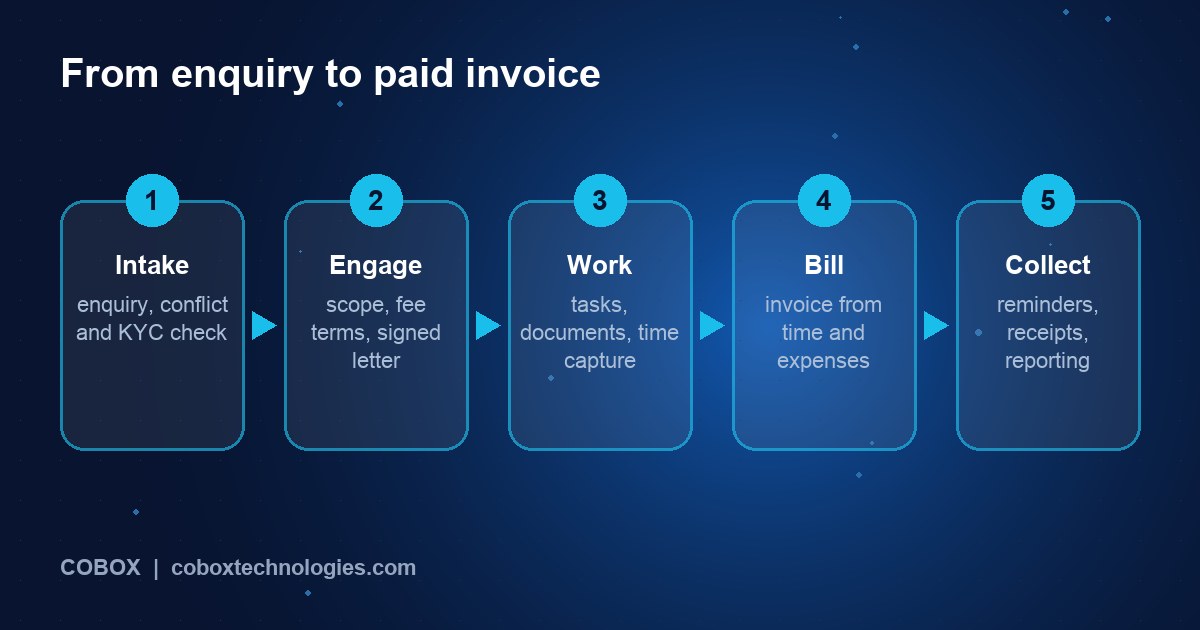
After digitisation, every matter has a record with parties, court or forum, next hearing dates, tasks and documents. A conflict check runs when a new enquiry arrives. Lawyers record time in a small timer or by quick entry on mobile. Documents are stored with permissions so only the matter team can open them. Clients log in to see hearing dates, upload documents and receive invoices. At month end the invoice drafts itself from recorded time and expenses; the partner reviews and approves it. Receivables ageing is visible on one screen, and follow-up reminders go out automatically.
Features that matter
| Area | MVP | Later |
|---|---|---|
| Matters and clients | Matter records, parties, conflict check, tasks, deadlines and calendar | Court or filing integrations, workflow templates |
| Documents | Secure storage, versioning, permissions, search, templates | Document assembly, e-signature, redaction tools |
| Time and billing | Timers, expense capture, rates, invoices, GST, payment links | Retainers, fixed fees, trust or client money accounting |
| Client portal | Status, document exchange, invoices, messaging | Questionnaires, e-sign, secure video |
| Reporting | Utilisation, realisation, receivables ageing, matter profitability | Forecasts, partner dashboards |
| Security | Role-based access, audit logs, two-factor login, encryption | Client-specific access, data residency controls |
For scope discipline see what to include in an MVP. The integration backbone, especially accounting, is covered in connecting CRM, accounting and order systems.
Confidentiality is a product requirement
Client confidentiality and privilege are central to professional duty. Software must support ethical walls (restrict a matter to named people), access logging, secure sharing without email attachments, and sensible retention and deletion. Review your hosting location, backups and vendor access with the same care you would give a client-money account. Our security approach and security checklist are good starting points.
Architecture in plain language
- Staff web application: matters, time, documents, billing; desktop-first with a mobile timer.
- Client portal: simple, branded, secure.
- Backend: matter data, document store, billing engine, audit log.
- Integrations: accounting software, email and calendar, e-signature, payment gateway, WhatsApp. See API integrations.
- Hosting: reliable cloud with encryption and tested backups. See cloud infrastructure.
Plan the migration carefully. Moving ten years of files and a client register is often the hardest part; the approach in modernising old software without disrupting operations applies here.
Costs and timeline (illustrative)
| Option | Scope | Indicative cost | Indicative time |
|---|---|---|---|
| Ready-made practice tool | Configuration, migration, training | ₹1,000-3,000 per user per month plus setup | 2-6 weeks |
| Custom internal system | Matters, documents, time, billing, portal | ₹10-25 lakh | 3-5 months |
| Niche practice SaaS v1 | Multi-firm accounts, billing, templates, admin, support tools | ₹25-50 lakh | 6-9 months |
Add 15-20 percent of build cost each year for maintenance; see software maintenance costs. Compare quotes against a written scope.
Worked economics: realisation
Realisation is the share of potential billable value that turns into cash. Take Rao and Partners (hypothetical) with six fee-earners, each working 1,800 hours a year with a billing rate of ₹3,000 an hour at 60 percent utilisation.
- Billable hours per fee-earner: 1,800 x 0.60 = 1,080
- Potential billings at the standard rate: 6 x 1,080 x ₹3,000 = ₹1,94,40,000 a year
- Suppose 8 percent of work goes unrecorded, and 7 percent of recorded time is written off or discounted because invoices go out late or without detail: realisation is 0.92 x 0.93 = 85.6 percent, giving about ₹1,66,33,000 collected from time
Now assume the software lifts recording to 96 percent (a 4-point gain) and cuts write-offs to 4 percent: realisation is 0.96 x 0.96 = 92.2 percent, giving ₹1,79,16,000. The difference is about ₹12.8 lakh a year. If the system costs ₹15 lakh to build and ₹2.5 lakh a year to maintain, the payback period is roughly 17 months (₹15 lakh divided by about ₹10.3 lakh of net annual gain) under these assumptions. Treat the improvement as a hypothesis to measure, not a promise: record your own baseline for three months first.
Also watch the collection cycle. If receivables average 75 days and automated invoices and reminders reduce that to 50 days, a firm billing ₹1.66 crore a year releases about ₹11.4 lakh of working capital (₹1.66 crore x 25 / 365). Keep revenue, profit, and cash separate in reports; see weekly dashboard numbers. Test demand for a SaaS product with our validation guide.
Growth and adoption levers
- Partner sponsorship: adoption fails when partners keep paper habits. One senior champion changes culture.
- Start with billing: money recovered is the clearest early win.
- Client portal as a differentiator: clients value visibility and may choose firms that offer it.
- Templates: reusable engagement letters, checklists and workflows save time on repeat work.
Measure utilisation, realisation, days to invoice, receivables ageing and matters per fee-earner, as described in measuring the first 90 days.
Seven-phase rollout plan
- Map workflows: follow three matters end to end and list pain points.
- Baseline: measure current recording rate, time to invoice and receivables.
- Select or define scope: choose buy, configure or build.
- Pilot with one team for 4-6 weeks.
- Migrate data in stages, starting with active matters.
- Roll out to all with training and a named support person.
- Review quarterly against the baseline and refine.
Risks and compliance
- Professional rules: bar council or institute rules govern confidentiality, advertising, client money and conflicts; follow your regulator's guidance when configuring features.
- Personal and confidential data: India's Digital Personal Data Protection Act, 2023 applies to personal data handling; also consider contractual confidentiality duties. Seek advice on retention and cross-border storage.
- Breach impact: a leak of client files is reputationally severe. Use two-factor login, encryption, access logs and tested backups.
- AI features: sending client material to external AI services raises confidentiality questions. Check vendor terms and client consent before using them.
- Template accuracy: automated documents must be reviewed and updated when law changes.
- Vendor lock-in: ensure you can export your data in usable formats.
- Taxes: GST on professional fees and reimbursements follows specific rules; confirm with an accountant.
These are pointers for your advisers, not legal advice.
How COBOX can help
COBOX helps you decide whether to buy, configure or build, and then does the work. We map your workflows, produce a Blueprint, build the matter, billing and client portal modules, integrate accounting and e-signature, and plan a careful data migration. See business process automation, CRM and customer portals and digital transformation.
Frequently asked questions
Should a small firm build custom software?
Usually not. A ready-made tool is cheaper and quicker. Build only for unusual workflows, a niche product, or when owning the data and brand matters.
How much does legal practice software cost?
Ready-made tools charge per user per month; a custom internal system often costs ₹10-25 lakh. Prices depend on scope and integrations.
Is cloud software safe for client files?
It can be, if configured properly with encryption, access controls, backups and a reputable host. Review it as you would any outsourcing arrangement.
How do I get partners to record time?
Make recording faster than not recording: timers, mobile entry, calendar suggestions, and visible results such as quicker invoices.
Can the portal replace email?
For documents and status, yes. Clients still use email, so provide notifications that link into the portal.
What about AI summarisation?
It can save time but must respect confidentiality. Use approved tools, review outputs and tell clients if required.
How long does migration take?
Weeks for active matters, longer for archives. Migrate in stages and keep the old system read-only during transition.
Does this apply to CA and consulting firms?
Yes. Replace matters with engagements and add recurring compliance calendars and document collection checklists.
Turn your idea into a plan
Planning to digitise a professional firm or build software for one? Start with a Business Blueprint covering users, workflows, MVP features, technology and rollout roadmap. Paste something like this into the Blueprint tool:
I run a [law / CA / consulting] firm with [number] professionals and [number] active matters. I need matter management, time and billing and a client portal. Suggest what to buy versus build, an MVP plan and a migration approach.
Or talk to us first, and read about the Business Blueprint.