 COBOX
COBOX
How to Digitise a Construction Business: Projects, Sites, Materials and Payments

A construction project is a lot of small decisions made far from the office: how many bags of cement arrived, whether the shuttering crew finished, which subcontractor is owed what, and whether yesterday's rain delayed the slab. When those decisions are recorded in notebooks, WhatsApp photos and verbal updates, the head office finds out about cost overruns long after they happened. The margin in construction is thin enough that a few percent of leakage can erase it.
This guide is for contractors, builders, developers and construction-services founders who want to digitise project operations or build software for the industry. We cover business models, how each earns, the features that matter, why site adoption is the real challenge, worked economics, risks and a rollout plan. Scenarios are hypothetical and figures illustrative.
Where construction businesses lose money
Most leakage comes from four places, and each can be tracked:
- Materials: over-ordering, wastage, theft and unrecorded transfers between sites.
- Labour and subcontractors: unclear scope, duplicate payments, advances not adjusted.
- Time: delays that carry costs in idle labour, equipment hire and penalties.
- Billing: work done but not measured or billed on time, which also delays cash.
Business models you can adopt or build
1. Internal project management for a contractor
You adopt or build a system for your own projects: budgets, schedules, site reports, materials and payments. This is the highest-value starting point for a mid-sized contractor with several active sites.
2. Construction management SaaS
You sell project, site and billing software to many contractors, usually priced per project or per user. Focus on a segment, such as residential builders or interior contractors, rather than all construction.
3. Materials marketplace or procurement platform
You connect contractors with suppliers for cement, steel, tiles and fittings, earning commission or a trading margin. Prices move constantly and credit terms matter. See B2B wholesale ordering for the supplier-buyer mechanics.
4. Subcontractor and labour marketplace
Skilled trades, such as electricians, tilers and carpenters, find work and contractors find crews. This overlaps with recruitment and staffing but adds site coordination and measurement-based payments.
5. Home renovation and interiors platform
Homeowners describe a project, receive designs and quotes, and the platform manages delivery. Revenue is a margin on project value. Execution quality and scope changes are the hard parts, similar to real estate platforms.
| Model | Revenue | Capital need | Main challenge |
|---|---|---|---|
| Internal system | Margin saved, faster billing | Low | Site-level adoption |
| Construction SaaS | Subscription | Low | Training, long onboarding |
| Materials marketplace | Commission or margin | Medium to high | Credit, price volatility, logistics |
| Labour marketplace | Commission | Low to medium | Reliability and disputes |
| Renovation platform | Project margin | Medium | Execution quality, scope creep |
A hypothetical scenario: a four-site contractor
Consider a fictional contractor, Bhatt Constructions, running four residential sites. Each site engineer sends a WhatsApp message with a photo and a few lines each evening. Material orders are placed by phone. The head office learns that a site has run out of steel only when work stops. Subcontractor bills arrive as photos of handwritten measurements, and the accountant spends two days each month reconciling them.
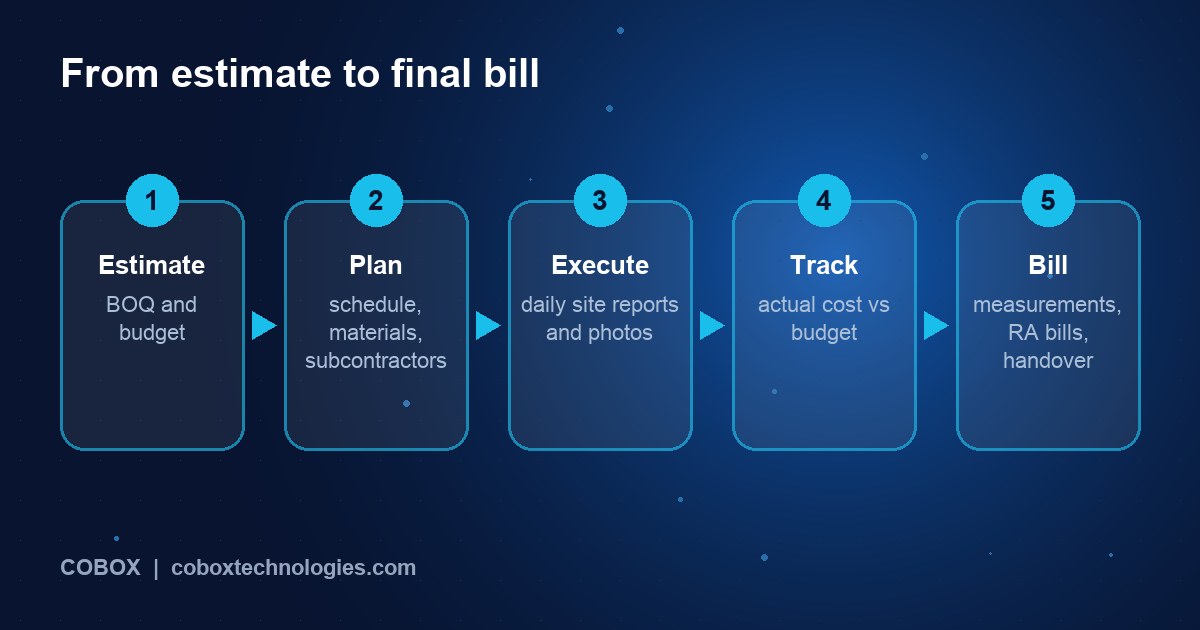
With a project system the budget for each site is entered as a bill of quantities with cost heads. The engineer records the daily report on a mobile app (workers present, work done, photos, materials received), even offline. A material requirement is raised in the app, approved by the project manager, and sent to the supplier; goods received are matched against it. Subcontractor measurements are entered and approved, and the system computes payable amounts net of advances. The owner opens a dashboard on Monday and sees each site's budget against actual cost, percentage complete, and the next three days of material needs.
Features that matter
| Area | MVP | Later |
|---|---|---|
| Projects and budgets | Budget by cost head, schedule milestones, progress percentage | Gantt scheduling, earned value, change-order management |
| Site reports | Daily report, photos, labour attendance, issues, offline support | Drawings with markups, safety checklists, geo-tagging |
| Materials | Requisition, approval, purchase order, goods received, stock by site | Rate contracts, supplier comparison, wastage analysis |
| Subcontractors | Work orders, measurements, running bills, advance adjustment | Performance ratings, retention tracking |
| Billing and accounts | Client RA bills, GST invoices, payments received | Accounting integration, cash-flow forecast |
| Reporting | Budget vs actual, pending approvals, receivables | Profitability by site, benchmark rates |
Apply the discipline from what to include in an MVP. Start with the process that leaks the most money, which is usually materials or subcontractor billing; our guide on which process to automate first gives a simple scoring method.
Design for the site, not the office
- Works offline and syncs when signal returns.
- Few taps per task: an engineer on a ladder will not fill a long form.
- Local languages and voice notes for supervisors.
- Photos as the default evidence, time-stamped.
- Approval flows that do not block work: urgent requests need a fast path with after-the-fact review.
Architecture in plain language
- Site mobile app (offline-first): reports, requisitions, receipts, measurements. See mobile app vs web app and mobile app development.
- Office web application: budgets, approvals, billing, dashboards.
- Backend: project data, approvals, ledgers, document store.
- Integrations: accounting software, GST invoicing, WhatsApp, supplier catalogues. See API integrations.
- Dashboards: see analytics dashboards.
Costs and timeline (illustrative)
| Build | Scope | Indicative cost | Indicative time |
|---|---|---|---|
| Contractor project MVP | Budgets, site reports, materials, subcontractor bills, dashboard | ₹10-24 lakh | 3-5 months |
| Construction ERP integration | Add accounting, GST billing, approvals, payroll export | ₹8-18 lakh extra | 2-4 months |
| Construction SaaS v1 | Multi-company, roles, templates, mobile apps, billing | ₹30-60 lakh | 7-10 months |
Ready-made tools exist; compare using custom vs ready-made software. Plan 15-20 percent of build cost a year for maintenance (details here).
Worked economics: material leakage
Assume Bhatt Constructions (hypothetical) has four sites with a combined annual turnover of ₹40 crore, a 12 percent net margin before overheads, and material spend equal to 45 percent of turnover.
- Annual material spend: ₹40 crore x 0.45 = ₹18 crore
- If unplanned over-ordering, wastage and unrecorded transfers add 3 percent to material cost: ₹18 crore x 0.03 = ₹54 lakh of leakage
- Suppose requisition approvals, goods-received matching and stock visibility cut that leakage by one third: saving about ₹18 lakh a year
Compare with a ₹18 lakh system and ₹3 lakh a year of maintenance: payback is about 14 months if the one-third reduction holds. Measure your actual leakage first by auditing one site for a month.
The second lever is billing delay. If running bills reach clients 20 days sooner on average, and annual billing is ₹40 crore, the cash released is about ₹40 crore x 20 / 365 = ₹2.2 crore of working capital. In a business that borrows at, say, 12 percent, that is around ₹26 lakh a year of interest avoided. These estimates are rough; use your own figures. Keep revenue, margin and cash separate in reports; see weekly dashboard numbers. For SaaS plans, test willingness to pay with the validation guide.
Adoption levers
- Start with one site and one process: prove value on materials before adding everything.
- Visible benefit for engineers: faster approvals and fewer calls make them champions.
- Tie payments to the system: subcontractors paid only on approved measurements encourages correct entry.
- Weekly review rhythm: owners who look at the dashboard create the habit.
Track budget variance, requisition-to-delivery time, days to bill, pending approvals and daily-report completion, as covered in measuring the first 90 days.
Seven-phase rollout plan
- Site walk and mapping: follow a material from request to consumption.
- Baseline leakage and delays on one site.
- Define the MVP around the biggest leak.
- Build and train a pilot site team.
- Run the pilot for 6-8 weeks and compare against the baseline.
- Roll out to remaining sites and enforce approvals.
- Add accounting and forecasting once data is reliable.
Moving off spreadsheets and chat groups is a familiar journey; see Excel and WhatsApp: when to upgrade.
Risks and compliance
- Safety and labour laws: construction workers fall under specific labour, safety and welfare rules; software can record compliance but does not replace it. Take legal advice on contract labour and building worker welfare requirements.
- RERA and approvals: if you are a developer, project registration and disclosures under the Real Estate (Regulation and Development) Act apply; confirm state-specific requirements.
- Contracts and disputes: measurement records and photos protect you in disputes, so keep them tamper-evident.
- Personal data: worker IDs and attendance are personal data under India's Digital Personal Data Protection Act, 2023; get advice on consent and retention. See our security page.
- Adoption failure: if site staff avoid the app, data goes stale. Train repeatedly and simplify.
- Taxes: GST and TDS on works contracts are complex; confirm with an accountant.
These are pointers for your advisers, not legal advice.
How COBOX can help
COBOX helps contractors and founders pick the process that leaks the most, then builds around it. We spend time understanding site realities, produce a Blueprint, build offline-capable site apps and office dashboards, and integrate accounting and messaging. See business process automation, MVP development and digital transformation.
Frequently asked questions
Where should a contractor start?
With materials requisition and goods-received tracking on one site, because the savings are visible quickly.
How much does construction software cost to build?
A focused contractor MVP typically costs ₹10-24 lakh in India. A SaaS product costs considerably more.
Will site engineers actually use it?
If it is faster than WhatsApp and works offline, yes. Test the app on a real site before rollout.
Can I use ready-made tools instead?
Often, yes. Custom builds make sense for unusual workflows, a SaaS product, or tight integration with your accounts.
How do I handle subcontractor measurements?
Capture quantities against work orders with photos, require approval by the site engineer and project manager, and compute payable amounts automatically.
Does it help with client billing?
Yes. Recorded progress supports running bills sooner and with evidence, which speeds up collections.
What about drawings and BIM?
Start with document storage and versioning. Specialist design tools can be integrated later.
How long until it pays back?
It depends on your current leakage and billing delays. Measure a baseline on one site before deciding.
Turn your construction idea into a plan
Planning to digitise a construction business or build software for it? Start with a Business Blueprint covering users, workflows, MVP features, technology and rollout roadmap. Paste something like this into the Blueprint tool:
I run a [contracting / building / interiors] business with [number] active sites and annual turnover of about ₹[amount]. My biggest problems are [materials / subcontractor billing / delays]. I need an MVP plan, an offline-capable site app approach and a rollout plan.
Or talk to us first, and read about the Business Blueprint.